The New POS Playbook: 5 Things Modern Retailers Should Look for in a Point-of-Sale System
Picture a wine and spirits shop outside Columbus on the Saturday before Christmas. The POS freezes for forty minutes. Not a crash, just a freeze, with maybe thirty people in line holding gift bottles and staring at the owner. He takes cash where he can, scribbles card details on a legal pad (not his proudest moment), and spends most of January untangling what actually sold.
Some version of that day is why I think most retailers shop for a point-of-sale system the wrong way. They compare feature lists, and every vendor’s list looks about the same. What they should be asking is much less glamorous: what does this thing do on my worst day?
Why Feature Lists Don’t Help Much
Cloud-based, integrated payments, reporting, loyalty. Every POS on the market claims all four, so the checklist ends up telling you almost nothing about which one will actually hold up.
The difference is in behavior, not boxes. A report that’s accurate Monday morning but runs ten minutes behind during a rush is useless when you’re deciding whether to pull a promo. “Real-time inventory sync” can mean two seconds or two hours depending on who wrote the marketing copy.
1. Inventory Counts You Can Actually Trust
Start here, because this is where the money quietly leaks out. IHL Group’s 2025 study on inventory distortion pegs the global cost of out-of-stocks and overstocks at around $1.77 trillion, which works out to roughly 6.5% of retail sales. People hear that number and think Walmart.
But a 3,000-SKU independent shop feels the same thing, just in smaller pieces: a case of rosé nobody’s touched since June, a regular who came in for a specific rye and left without it.
What you want is a count that updates with every sale, return, and delivery as it happens, not in a batch overnight. Receiving matters more than people think. If a distributor shorts you two cases and your staff checks the box anyway, the system now believes something that isn’t true, and every reorder after that is a little bit off.
One practical test I like: during the demo, ask the rep to fix a miscounted delivery and then show you where that correction lives in the history. If they reach for an export button and start talking about spreadsheets, you’ve learned what you needed to.
2. Checkout That Keeps Moving
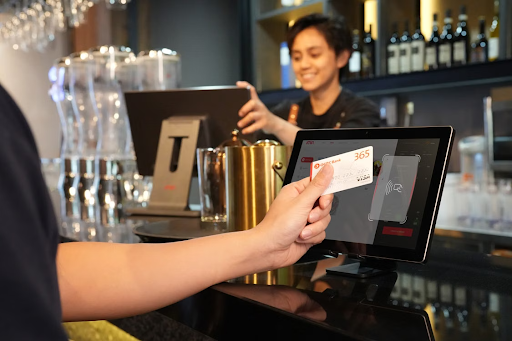
Customers never see your back office. They see the register, and they judge the whole store by how fast they get through it. Paysafe surveyed small US retailers and 89% called a great payment experience business-critical, which, honestly, sounds low to me.
Tap-to-pay, chip, and mobile wallets should be standard by now. The feature that separates good systems from okay ones is offline mode, the ability to keep accepting cards when the internet drops. Ask about it directly, because it often isn’t in the brochure. Ask too how processing fees are itemized, since a vague answer there usually means a bad rate.
Money Inc covered how high-end shoppers abandon purchases over checkout friction online, and the counter isn’t so different. People don’t like to wait while you figure out how to split a payment.
It’s also worth asking how easily new payment types get added. Stablecoins are already being tested for everyday transactions. I’m not suggesting your corner store needs to take crypto next month. I’m suggesting you don’t want a system that needs new hardware every time something changes.
3. Built For Your Category, Not “Retail”
Think about how different a liquor store’s Friday night is from a shoe store’s. Every sale might need an ID check, and that check can’t add twenty seconds to each transaction. One SKU sells as a single, a four-pack, and a full case, and inventory has to reconcile across all of them. Then there are bottle deposits, state excise rules, mix-and-match pricing on a six-bottle wine discount.
A general retail POS can sometimes be configured to do most of this. “Sometimes” and “most” are doing a lot of work in that sentence.
Generalists Vs. Specialists
Square, Clover and Lightspeed are good products, and for plenty of shops they’re the sensible pick. Once compliance is part of almost every sale, though, the specialists start to make more sense.
In beverage alcohol, you’ll run into Bottle POS, KORONA, mPower Beverage and SanteHQ, which were built around case breaks and age verification from the start instead of adding them later.
For liquor retailers, the best point of sale system tends to be whichever one treats those workflows as normal rather than as exceptions you have to work around. SanteHQ is one example of that approach. Whatever’s on your shortlist, bring a real scenario to the demo.
4. Customer Data You’ll Actually Use
Your POS probably knows more about your customers than anything else you own, and most of that information just sits there.
It doesn’t need to be complicated. Loyalty should attach to a phone number in a couple of seconds at checkout, or staff will stop asking. After that, you want to be able to sort people by what they buy. The guy who picks up the same Napa cab every month should hear about the new vintage. The craft beer regular probably shouldn’t.
Larger retailers are taking this a lot further. Coruzant has a good explainer on composable customer data platforms, where companies keep one copy of customer data and push segments out to every channel from there. An independent store doesn’t need that kind of setup, but the basic idea, one clean record per customer used everywhere, is worth borrowing.
Getting It Onto The Shop Floor
Not all marketing has to land in someone’s inbox. A screen behind the register showing this week’s deals is about as cheap a channel as you’ll find, and Money Inc has a practical guide to turning a streaming device into a digital sign. Connect that to your sales data, and you can push whatever’s overstocked right now, instead of whatever you planned around back in January.
One note for liquor store marketing specifically: check how the platform handles SMS opt-ins. Alcohol promotions get extra scrutiny in a lot of states, and you don’t want to find that out from a complaint.
5. What It Really Costs Over Three Years
Hardware adds up, even if you want a spare terminal so one dead unit doesn’t close a lane. Processing fees at your real volume matter far more than the software fee. So do add-ons for loyalty or ecommerce, the hours your staff lose to training, and the contract terms nobody reads, particularly who owns your sales history if you decide to leave.
Here’s a rough example. Say a system costs $40 more a month but saves half a percent on processing. On $60,000 in monthly card sales, that’s $300 saved against $40 spent. The “expensive” option wins pretty quickly. Do the math with your own numbers, though, not the vendor’s.
A Simple Way To Score Your Finalists
Rate each system from one to five on five questions:
- Do I trust its inventory count on a Saturday night?
- Can it take cards when the internet’s down?
- Does it handle my category’s rules without workarounds?
- Could I run a customer campaign from it this week without hiring help?
- What’s the honest 36-month cost?
If anything scores under a three on the first or third question, I’d walk away. Those problems get worse over time, not better.
Conclusion
If that Columbus owner went shopping again, the right system probably wouldn’t be the cheapest one or the one with the slickest demo. It would be the one still working the following December, which is the whole point.
General-purpose platforms like Square and Lightspeed are perfectly good choices for a lot of retailers. Specialists like SanteHQ, Bottle POS and KORONA are worth a serious look. Judge it by your worst Saturday, price it over three years, and pick something your newest employee can learn before lunch.