5 Best Remote Desktop Solutions for Startups Scaling on a Tight Budget
For a startup watching every dollar, remote desktop software is one of the highest-impact tools you can buy: it lets a distributed team work from anywhere, supports clients and servers without travel, and trims office overhead. Splashtop leads these best remote desktop solutions for startups because it pairs affordable, scalable pricing with the performance and security usually reserved for enterprise tools. Below are five options that stretch a tight budget, with a checklist to match one to your stage.
The savings are real. Global Workplace Analytics estimates employers save roughly $11,000 per employee per year when staff work remotely half the time, and the breakdown below shows where that money goes.
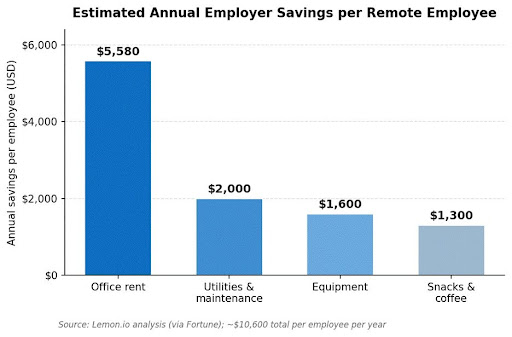
Office rent is the biggest line item a remote-first startup avoids. Source: Lemon.io analysis via Fortune; see the cost savings of remote work for the full estimate.
Quick Budget Checklist
Before you commit, confirm the tool fits a startup’s reality:
- Price that scales gently: per-user or per-device pricing that grows with headcount, not in big jumps.
- Security that costs nothing extra: 256-bit encryption and free multi-factor authentication, plus sound RDP and remote-access protection.
- Cross-platform support: Windows, Mac, and Linux coverage so no device is left out.
- A real free tier or trial: test before you spend.
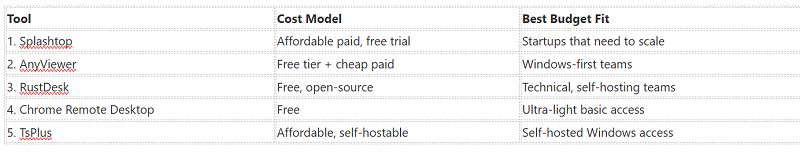
Comparison at a Glance
The 5 Best Remote Desktop Tools for Startups
1. Splashtop – Best Value for Scaling Teams
Best Value Pick for Scaling Startups in 2026
Splashtop delivers enterprise-grade remote desktop at startup pricing. Entry plans start in the single digits per user each month, sessions stream at up to 4K with low latency and multi-monitor support, and every connection is secured with TLS, 256-bit AES encryption, and multi-factor authentication. It runs on Windows, Mac, Linux, iOS, Android, and Chromebook, and scales cleanly as you add users and devices, so it grows with the company instead of forcing a costly switch later. You can explore the best remote desktop solutions for startups and start a free trial on Splashtop’s site.
“Splashtop hit the budget value and the feature requirements and it was easy to get rolling.” – Verified User, Capterra (Splashtop Remote Access holds 4.8/5 from 500+ reviews)
Pros: Affordable pricing that scales; 4K low-latency performance; AES-256 encryption and MFA included; broad platform support.
Cons: No built-in voice chat; some advanced features sit on higher tiers.
Best for: Startups that want a low-cost tool that still scales.
Contact: Website: https://www.splashtop.com
2. AnyViewer – Generous Free Tier
AnyViewer offers one of the better free tiers in the category, connecting Windows machines quickly with file transfer and two-factor authentication at no cost. Paid plans stay inexpensive when you outgrow the free limits. It is strongest in Windows-first environments and lighter on Mac and Linux.
Pros: Generous free tier; quick Windows connections; file transfer and two-factor authentication included; inexpensive paid plans.
Cons: Windows-first, with lighter Mac and Linux support; fewer controls for larger teams.
Best for: Budget-conscious, Windows-first startups.
Contact: Website: https://www.anyviewer.com
3. RustDesk – Free and Open-Source
RustDesk is open-source and free, and you can self-host it on your own server for full control of your data, a strong fit for technical founders who want zero licensing cost. It runs across Windows, Mac, Linux, and mobile and encrypts sessions end to end. The trade-off is that setup and maintenance fall on your team.
Pros: Free and open-source; self-hostable for full data control; cross-platform with end-to-end encryption; no licensing cost.
Cons: Setup and maintenance fall on your team; community-based support.
Best for: Technical startups that want free software and data control.
Contact: Website: https://www.rustdesk.com
4. Chrome Remote Desktop – Free and Simple
Chrome Remote Desktop is completely free and about as simple as remote access gets: sign in with a Google account, install the extension, and connect from any browser. It lacks the management features a growing team eventually needs, but for early-stage basic access it costs nothing.
Pros: Completely free; simple setup with a Google account; works from any browser; nothing to pay as you grow.
Cons: Lacks team management features; too basic for a scaling team.
Best for: Very early startups needing free, basic access.
Contact: Website: https://remotedesktop.google.com
5. TsPlus – Affordable and Self-Hostable
TsPlus delivers affordable remote desktop and application access that you can self-host, with pricing that scales per concurrent user rather than per device. It suits teams that want to publish Windows apps or desktops to a distributed workforce without enterprise licensing costs.
Pros: Affordable and self-hostable; per-concurrent-user pricing; publishes Windows apps and desktops; avoids enterprise licensing costs.
Cons: Windows-centric; needs more setup than cloud tools.
Best for: Budget teams wanting self-hosted Windows access.
Contact: Website: https://www.tsplus.net
FAQs
What is the cheapest reliable remote desktop tool for a startup? Free options like RustDesk and Chrome Remote Desktop cost nothing, and AnyViewer has a capable free tier. If you need a paid tool that still scales, Splashtop offers the strongest balance of low price, performance, and security.
Do free remote desktop tools have enough security for a business? Some do, but check the specifics: look for strong encryption, free multi-factor authentication, and active maintenance. Paid tools like Splashtop bundle AES-256 encryption and MFA by default, which simplifies security for a small team.
Why does Splashtop top this list for startups? It combines affordable per-user pricing with 4K performance, AES-256 encryption, multi-factor authentication, and broad platform support, so it fits a tight budget today and scales as the company grows.
The Bottom Line
For a startup scaling on a tight budget, Splashtop is the standout, offering enterprise-grade remote desktop performance and security at a price that grows gently with your team. AnyViewer and Chrome Remote Desktop cover free and near-free needs, RustDesk suits technical teams that want to self-host, and TsPlus fits self-hosted Windows access. Start with a free trial, test it across your team’s devices, and scale up only as you grow.
References:
- Fortinet. (2026). What Is Remote Desktop Protocol (RDP)? https://www.fortinet.com/resources/cyberglossary/remote-desktop-protocol
- Global Workplace Analytics. (2025). Latest Work-at-Home / Telecommuting / Remote Work Statistics. https://globalworkplaceanalytics.com/telecommuting-statistics
- Fortune / Lemon.io. (2022). Remote work saves companies money per worker. https://fortune.com/2022/10/22/remote-work-saves-companies-money-recession/
- Capterra. (2026). Splashtop Reviews. https://www.capterra.com/p/162972/Splashtop-Business-Access/reviews/